Affiliate disclosure: this article contains affiliate links. If you buy through them, Broken Build Studios may earn a small commission at no extra cost to you.
The ideal pixel art size for your game depends on several factors: genre, camera distance, animation complexity, platform targets, and the overall visual style you want to achieve. While there is no universal resolution that works for every project, understanding how sprite size influences gameplay readability and production workload can save countless hours during development.
Pixel art has evolved far beyond the technical limitations that originally created it. Today, developers intentionally choose pixel art because it offers a unique aesthetic, efficient production pipelines, and timeless visual appeal. Whether you’re building an indie RPG, action platformer, or retro-inspired adventure, selecting the right pixel dimensions is one of the most important artistic decisions you’ll make.
If you’re looking for a reliable drawing tablet for creating sprites, animations, and concept art, consider checking out this popular digital art tool used by many indie developers.
Why Pixel Art Size Matters
Sprite dimensions affect much more than appearance. They directly influence:
- Character readability during gameplay
- Animation detail and fluidity
- Level design possibilities
- User interface scaling
- Production time
- Memory usage and performance
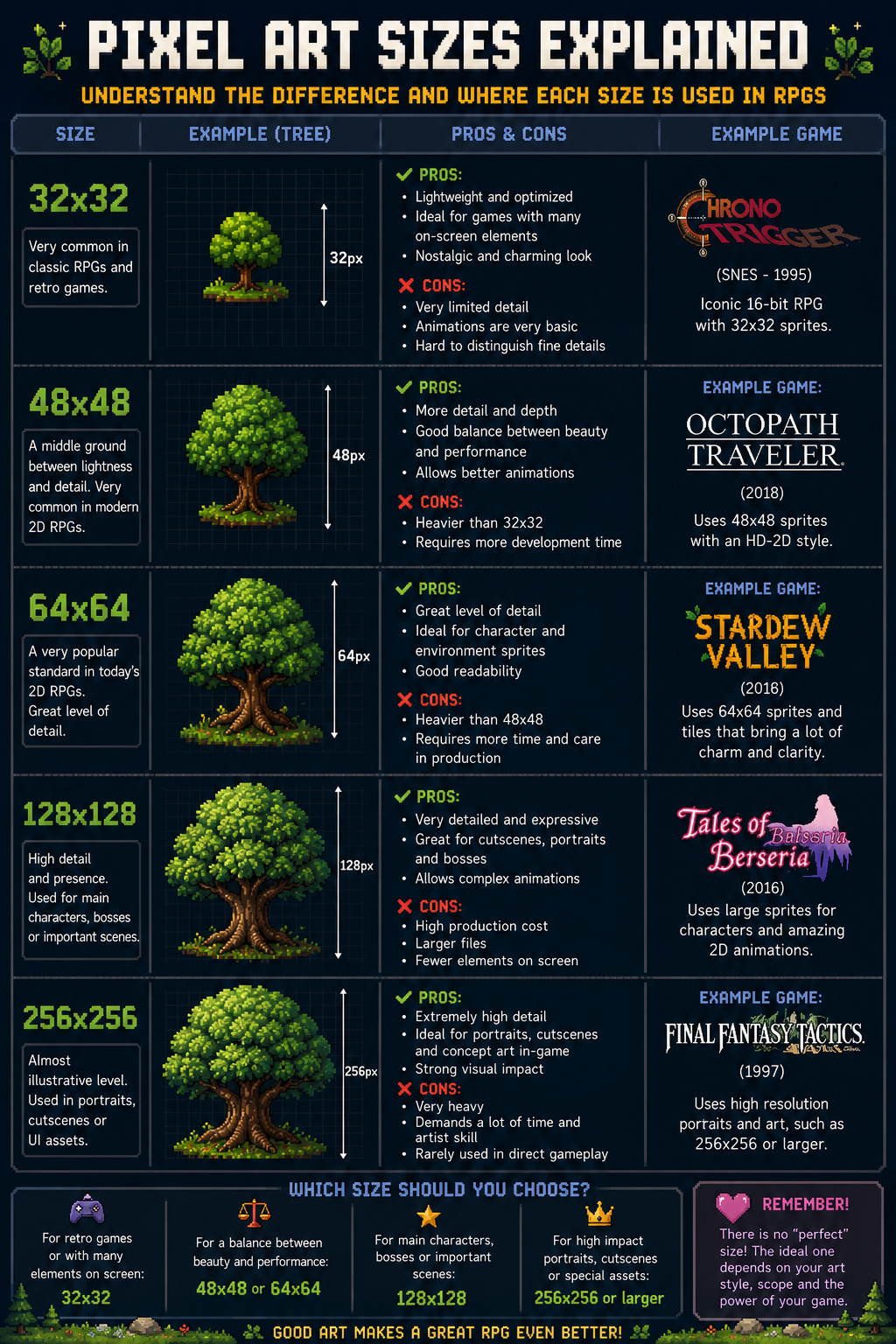
A 16×16 character sprite communicates information very differently than a 64×64 or 128×128 sprite. As sprite sizes increase, artists gain more room for detail, but development complexity also grows significantly.
Common Pixel Art Sprite Sizes
16×16 Pixels
The classic retro approach. Popular in early RPGs, roguelikes, and minimalist indie games.
Advantages include:
- Fast asset production
- Strong retro aesthetic
- Low memory requirements
- Easy animation workflows
However, storytelling through character design becomes more challenging because there are fewer pixels available to communicate visual details.
32×32 Pixels
Often considered the sweet spot for modern indie games. This size provides enough room for expressive character designs while maintaining a recognizable pixel art appearance.
Many contemporary RPGs and adventure games use 32×32 sprites because they balance visual clarity with manageable production costs.
64×64 Pixels
This resolution allows significantly more personality and detail. Character animations become richer, facial expressions become easier to communicate, and combat systems can feel more dynamic.
Many modern action RPGs and exploration-focused games favor this range.
128×128 Pixels and Beyond
At this scale, pixel art begins blending with high-resolution digital illustration techniques. Developers gain tremendous artistic freedom, but the workload increases dramatically.
Large sprite sizes are often used in boss encounters, cinematic sequences, and highly detailed action RPG projects.
What Size Works Best for RPGs?
For most RPG projects, 32×32 and 48×48 sprites offer the best balance between readability, worldbuilding, and production efficiency.
RPGs rely heavily on exploration, character progression, storytelling, and environmental interaction. Players spend dozens of hours looking at characters from a consistent perspective, making visual clarity extremely important.
In general:
- 16×16 works well for highly retro JRPG-inspired experiences.
- 32×32 suits most modern indie RPGs.
- 48×48 and 64×64 support richer character writing through visual expression.
- 128×128 is usually reserved for special characters or cinematic moments.
How Camera Distance Influences Pixel Art Resolution
One of the biggest mistakes new developers make is choosing sprite sizes before defining the game’s camera.
A top-down RPG with a distant camera can achieve excellent results using 16×16 or 32×32 sprites. Meanwhile, a side-scrolling action RPG with close-up combat often benefits from 64×64 sprites or larger.
Ask yourself:
- How much screen space does the player occupy?
- How important are facial expressions?
- How many enemies appear simultaneously?
- How detailed should environments be?
The answers usually reveal the ideal sprite size more accurately than any predefined rule.
Should You Start Small or Large?
For most indie developers, starting smaller is the safer option.
Every increase in sprite size multiplies production requirements across:
- Animations
- Equipment variations
- Enemy designs
- NPC creation
- Environmental assets
- Visual effects
A 32×32 character may require hundreds fewer art hours than a comparable 64×64 character with the same animation depth.
Many successful indie games prioritize strong game mechanics, level design, and storytelling rather than maximizing visual detail.
Scaling and Resolution Best Practices
Regardless of sprite size, consistent scaling is critical.
Pixel art generally looks best when displayed using integer scaling values such as:
- 2x
- 3x
- 4x
- 5x
Fractional scaling can introduce blurriness and distort the clean edges that define pixel art aesthetics.
When planning your game’s resolution, establish a virtual canvas first and build every asset around that foundation.
How Modern Pixel Art Differs from Retro Pixel Art
Modern pixel art is no longer constrained by hardware limitations. Today’s artists deliberately use pixel techniques to achieve a specific visual identity.
As a result, many contemporary games combine:
- Traditional pixel art sprites
- Advanced lighting systems
- Particle effects
- Dynamic shadows
- Complex combat systems
- Modern narrative design principles
This hybrid approach allows developers to preserve nostalgia while delivering contemporary gameplay experiences.
FAQ
What is the most common pixel art size for indie games?
32×32 is currently one of the most common sprite sizes because it balances readability, detail, and production efficiency.
Is 16×16 pixel art still viable today?
Absolutely. Many successful indie games intentionally use 16×16 sprites to embrace retro aesthetics and simplify asset production.
Can I mix different pixel art sizes?
Yes, but consistency is important. Larger sprites are often reserved for bosses, important NPCs, or cinematic moments while standard characters maintain a unified scale.
What size should I use for an RPG protagonist?
For most RPG projects, 32×32 or 48×48 offers an excellent balance between detail and development efficiency.
Does larger pixel art always look better?
No. Larger sprites allow more detail, but visual quality depends on strong art direction, animation, and game design rather than resolution alone.
Choosing a Scale That Supports Your Vision
The best pixel art size is the one that serves your game’s goals rather than chasing technical trends. A carefully crafted 16×16 sprite can be more memorable than a highly detailed 128×128 character if it supports the game’s mechanics, worldbuilding, and storytelling.
Before creating hundreds of assets, build a small prototype with your intended camera distance, combat systems, exploration mechanics, and level design. Testing early often reveals whether your chosen scale feels comfortable during actual gameplay.
If you’re preparing to create your own sprite sheets, animations, or RPG assets, investing in a quality drawing setup can make the entire process smoother. Take a look at this recommended digital art tool to streamline your pixel art workflow and bring your game world to life.